High Availability
Run the Flow Scheduler on two or more nodes that share one database, with one leader that runs flows and standbys that take over when it fails.
High availability is off by default (ha.lease.enabled is false). A single node is always the leader and needs nothing on this page.
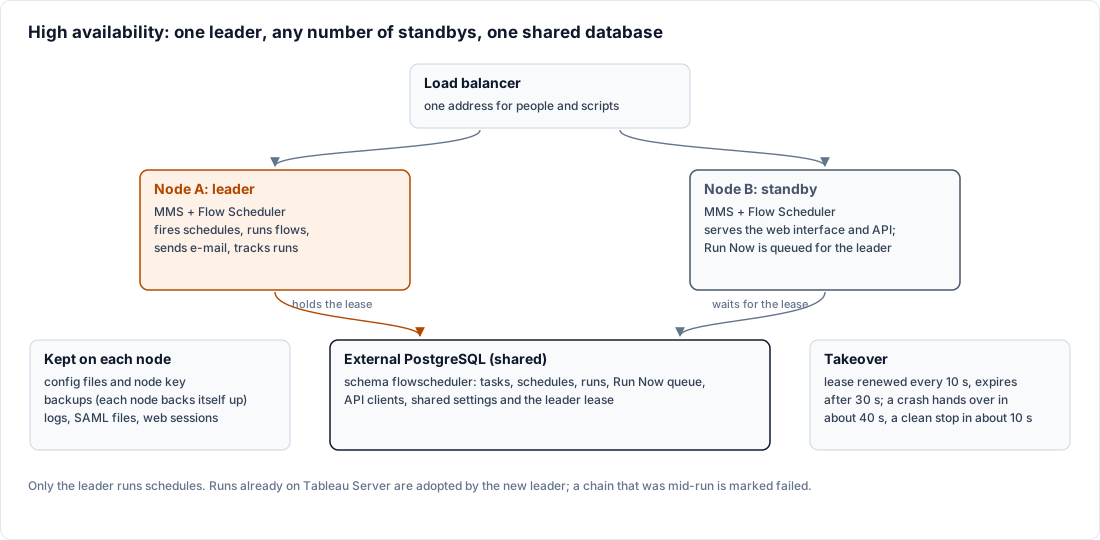
How it works
Each node is a host with its own MetaMiner Server (MMS) and Flow Scheduler. All nodes use the same flowscheduler schema in one external PostgreSQL database.
- Leader lease. The nodes compete for a lease held in the shared database. The holder is the leader and renews the lease every few seconds. If it stops renewing, the lease expires and a standby takes it.
- Only the leader acts. Firing schedules, submitting and tracking runs, sending e-mail, purging old history, taking configuration snapshots and collecting load data happen on the leader only. Standbys never run flows.
- Every node serves users. Users can sign in on any node. A Run on a task accepted by a standby is queued in the shared database and the leader runs it. Running a flow directly (not a configured task) works only on the leader's node.
- The leader needs its own MMS. The leader runs flows through its local MMS. When that MMS is unreachable for
ha.leader.mms.grace.seconds, the leader hands over to a standby whose MMS is healthy. If no standby has a healthy MMS, it stays leader. - Preferred node. You can star one node as the preferred node. When it is back and healthy for
ha.preferred.stable.seconds, leadership moves back to it. Without a star there is no automatic failback. - Settings are changed on the preferred node. Once a node is starred, you change shared Flow Scheduler settings on that node only; the other nodes take them over and apply them at their next Flow Scheduler restart. See Set Up High Availability.
- Tableau credentials reach every node. A Tableau Server login changed through the API on one node reaches the other nodes within seconds; a node that is down applies it when it is back. See Tableau Credentials API.
Failover in brief
When the leader stops cleanly, a standby takes over in about 10 seconds; after a crash, in about 40 seconds at most (default lease settings). Flows already running on Tableau keep running and the new leader keeps tracking them; a chain interrupted by the takeover is marked failed. If the shared database is down for every node, there is no leader and nothing is scheduled until it returns.
Every failover case with its timing, and how to hand over and upgrade: Failover and Upgrades.
Shared and per-node data
| Shared through the database | Per node |
|---|---|
| Schedules, tasks, chains, run history | Configuration files in the server folder |
| Run Now queue, leader lease, node status, leadership events | Backups (each node backs itself up) |
| E-mail outbox, subscriptions | SAML files in server\config\saml\ |
| Allowed environments, Flow Scheduler admins, API clients | Web sessions (in each MMS's memory) |
| Shared settings from the preferred node | Logs |
The HA / Nodes page
Flow Scheduler admins see the cluster in the web interface at Admin > HA / Nodes.
- The node table shows each node's role, the Preferred star, Active MMS, Failover, State, Last update and Last backup. A Last update that stops moving means that node is down.
- Make Leader on a standby moves leadership to it (planned handover).
- The star marks or clears the preferred node. Only one node can carry it.
- Leadership events lists takeovers, handovers and nodes going offline or online, with Time, Node, Event, Term and Detail. The term goes up by one on every change of leader.