How It Works
The Flow Scheduler Service (FSS) is a separate Windows service on the MetaMiner Server (MMS) host; it keeps its data in the MetaMiner Database (MMDB) and reaches users and Tableau Server only through MMS.
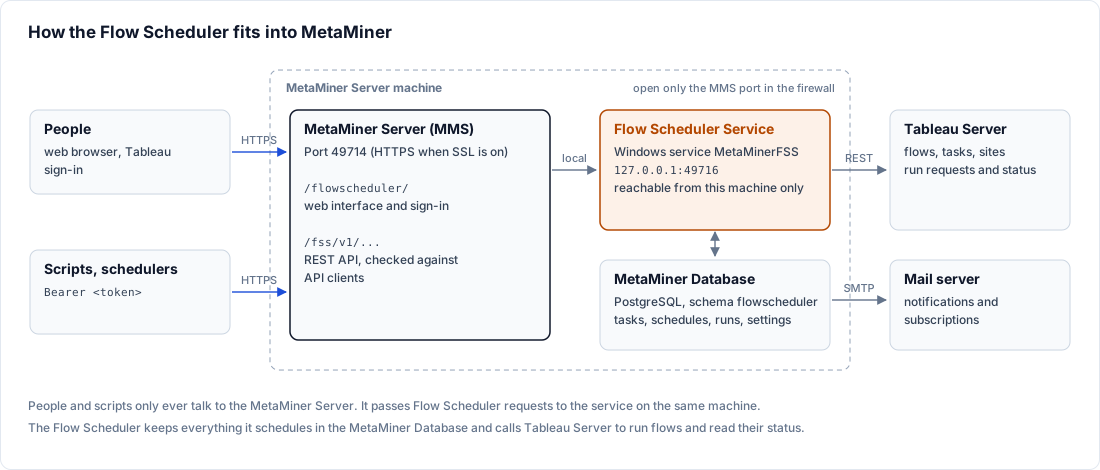
Components
| Component | Role |
|---|---|
| Flow Scheduler | Windows service MetaMinerFSS. Holds schedules, tasks and run history, decides when to fire, tracks runs and sends e-mail. Listens on 127.0.0.1:49716 only. |
| MetaMiner Server (MMS) | Windows service metaminer. Serves the web interface at /flowscheduler/, signs users in to Tableau, forwards their requests to the Flow Scheduler, and makes every Tableau Server call on its behalf. |
| MetaMiner Administrator (MMA) | Switches the Flow Scheduler on and edits its settings, allowed environments, admins and SAML in Tools > FSS Configuration.... Talks to the Flow Scheduler on the same host. |
| MetaMiner Database (MMDB) | Stores all Flow Scheduler data in the flowscheduler schema of the PostgreSQL database MMS uses. |
| Tableau Server | Runs the Prep flows. The Flow Scheduler never connects to Tableau directly. |
| Mail server | Receives notification and subscription e-mail. The Flow Scheduler uses the SMTP settings from MMA > Preferences > Settings > Email. |
Network paths and ports
The Flow Scheduler binds to the loopback address, so nothing outside the host connects to it. Everything goes through MMS on its normal port (49714 by default; HTTPS when SSL is enabled on MMS).
| Caller | Address | Path |
|---|---|---|
| Browser | https://<mms-host>:<port>/flowscheduler/ |
MMS serves the web interface. Its requests go to /api/flowscheduler/ on MMS, which checks the user's session and forwards them to the Flow Scheduler. |
| Scripts and schedulers | https://<mms-host>:<port>/fss/v1/ |
MMS checks the API client token and forwards to the Flow Scheduler. See REST API. |
| MMA | http://127.0.0.1:49716 |
Loopback only, so MMA must run on the Flow Scheduler host. |
| Flow Scheduler to Tableau | through the local MMS | MMS signs in to Tableau and starts and follows the flows. |
Firewall
Open only the MMS port (49714 by default) inbound. Keep 49716 (Flow Scheduler) and 49717 (MetaMiner Web Apps) closed. In a high-availability cluster the nodes coordinate only through the shared database, so 49716 stays closed between nodes too.
How a flow runs on Tableau
- When a schedule comes due, the Flow Scheduler records a run with status
PENDING. - It checks that the environment is allowed, that no other run of the task is active, and that Tableau Server is reachable.
- It asks MMS to start the flow. MMS signs in to Tableau with the environment's service account and starts the flow with the task's output steps, parameter values and run mode. The run is
SUBMITTED. - When the Tableau background job is found, the run becomes
RUNNING. - The Flow Scheduler polls the job through MMS (from the Tableau repository when it is configured for the environment) until it ends. The run then ends as
SUCCESS,FAILEDorCANCELLED; a run that cannot start ends asSTART_FAILED, and a job that can no longer be seen ends asLOST_VISIBILITY. - It queues the e-mails for the run.
All status values and their meanings: Run History.
max.concurrent.per.env limits how many runs are being submitted to one environment at the same moment. It limits the start-up burst, not how many flows run on Tableau.
Where the data lives
All Flow Scheduler data is in the flowscheduler schema of the MMDB. The Flow Scheduler creates and upgrades the schema itself when it starts. The MMDB must be PostgreSQL.
| Data | What it holds |
|---|---|
| Schedules | Flow Scheduler schedules, including those imported from Tableau |
| Tasks and chains | Flow, site, schedule, priority, owner, output steps, run mode, parameters, chain steps |
| Run history | Every run and chain step, with status, timings, Tableau job, rows written and parameters used |
| Run Now queue | Run requests waiting for the node that runs flows |
| Notification outbox | Every e-mail to send, its recipients, attempts and outcome |
| Subscriptions | Subscriptions, their recipients and per-environment subscription settings |
| Allowed environments and admins | Which environments the Flow Scheduler may run in; which Tableau users are its admins |
| API clients | REST API clients and the API audit trail. See Manage API Clients. |
| Cluster state | Leader lease, node status, shared settings and Tableau credential changes for high availability |
E-mail outbox
The Flow Scheduler does not send e-mail at the moment a run ends. It stores each message in the outbox first, and a background sender delivers it.
- A message survives a Flow Scheduler restart, because it is stored before it is sent.
- Each run produces at most one e-mail per event, even after a restart or failover.
- A temporary SMTP error is retried at growing intervals. If some recipients were accepted and others not, only the others are retried.
- A periodic check finds finished runs that have no e-mail yet and adds one.
Details: Notifications, Subscriptions and Output.
Services and logs
| Item | Value |
|---|---|
| Windows service | MetaMinerFSS, start type Manual. Starting MetaMiner from MMA (Start Server) also starts MetaMinerFSS when the Flow Scheduler is enabled; starting the metaminer service alone from Windows Services does not. |
| Listening address | 127.0.0.1:49716 |
| Working folder | C:\Program Files\Infolytik\MetaMiner\server\ |
| Logs | server\logs\flowscheduler.log and server\logs\flowscheduler.start.log; MMS writes its Tableau calls for the Flow Scheduler to server\logs\FSS_api_calls.log |