Manage API Clients
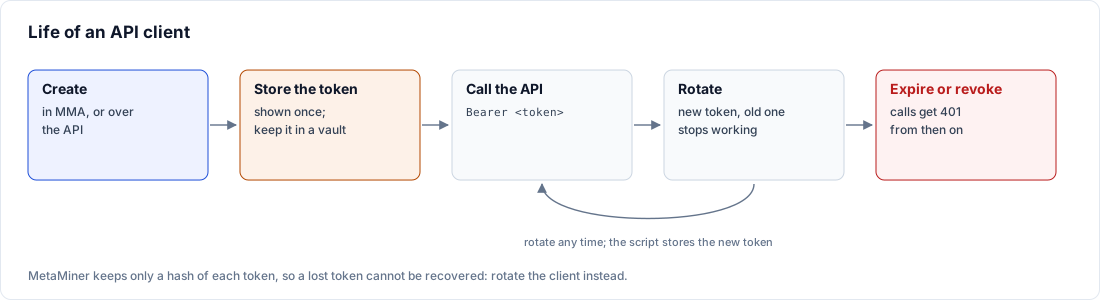
Create one API client per script or integration, so each caller has its own token, expiry and audit name and can be rotated or revoked on its own.
An API client has a name, a token and an optional expiry. Clients made in MetaMiner Administrator (MMA) have full access; clients made over the API can be limited to environments, sites and a Tableau user.
Where clients are stored
MetaMiner never stores a token, only its SHA-256 hash. A lost token cannot be recovered; rotate the client to get a new one.
| Flow Scheduler | Where the clients are kept | Who sees them |
|---|---|---|
| Switched on | The shared Flow Scheduler database | Every node of a high-availability pair. A change, rotation or revocation applies to all nodes at once. |
| Switched off | server\config\api-clients.json on the MetaMiner Server (MMS), hashes only |
This MMS only. MMA shows the same screen. |
When you switch the Flow Scheduler on, the clients in api-clients.json move into the Flow Scheduler database. A client whose name is already taken there gets the suffix -<host>. The file is then renamed.
Fail-closed behaviour
If the MMS cannot read the clients, it refuses every API call with 503 API_CLIENTS_UNAVAILABLE and the header Retry-After: 30. It never falls back to open access. This happens when the Flow Scheduler is switched on but not running on that node, or when api-clients.json cannot be read. Calls succeed again as soon as the clients can be read. Behind a load balancer that probes the nodes, the other node answers in the meantime.
Changes only on the leader
With the Flow Scheduler switched on, clients are created, changed, rotated and revoked on the leader node only:
- In MMA on the standby, the API Clients screen is read-only and names the leader.
- Over the API, a change sent to the standby gets
409 NOT_LEADERwith the leader's name. Retry through the load balancer or call the leader. - If the Flow Scheduler is switched on but not running on a node, MMA on that node is read-only too.
Reading clients and using tokens works on every node.
Access levels
| Access | Made in | Can do |
|---|---|---|
| Full: admin, no environment or site limits | MMA (always) or the API ("admin": true, no envIds, no siteIds) |
Every endpoint: Flow Scheduler API, Tableau credentials for any environment, backups, client management, audit |
| Admin limited to environments | API only ("admin": true with envIds) |
The Flow Scheduler API and Tableau credential changes for the listed environments. No client management, audit or backup. |
| Admin limited to sites | API only ("admin": true with siteIds) |
The Flow Scheduler API for the listed sites. No schedule changes, credential changes, client management, audit or backup. |
| Non-admin | API only ("admin": false, the API default) |
The Flow Scheduler API within its environment and site limits. Running a flow needs a bound Tableau user (tableauUsername) who may run it on Tableau Server. No schedule changes, credential changes, client management, audit or backup. |
For a non-admin client, MetaMiner checks the bound Tableau user's permission to run the flow; the flow itself runs under the environment's service account. This check needs trusted authentication set up on Tableau Server. A permission change in Tableau can take up to a minute to show. A non-admin client may cancel only runs it started or runs of tasks and chains it owns.
Names and tokens
| Item | Rule |
|---|---|
| Name | 1-128 characters: letters, digits, ., _ or -, starting with a letter or digit. Shown in the audit as the caller. |
| Reserved names | api, local and me, in any letter case |
| Name reuse | A live client's name cannot be reused (409). A revoked client's name can. |
| Token | mmsk_ followed by 43 characters (48 in all), generated by MetaMiner and shown once |
| Older tokens | Tokens starting fssk_ and the imported shared token keep working |
Before you begin
- Authorization for MMS API endpoints: is set to API clients (see Authorization Modes).
- You can run MMA on the MMS machine. In a high-availability pair, use the leader.
- You have a secrets vault ready to receive the token.
Steps
Create a client in MMA
- In MMA, choose Preferences > Settings... and open Advanced.
- In Server API Auth, click Manage API Clients.... The API Clients window opens.
- Click New.... The New API Client dialog opens.
- In Name:, enter a name for the caller, for example
secrets-rotation. - In Expires:, choose None (never expires), 30 days, 90 days or 365 days. The date is shown next to each option.
- Click Create. The API Client Token dialog shows the token once.
- Click Copy and store the token in your vault. If you close the dialog without copying, MMA warns: "The token has not been copied, and it cannot be shown again."
The API Clients window lists each client with the columns Name, Access (Full or Limited), Expires, Last used, Created, Created by and Status (Active, Expired or Revoked). With no clients it reads "No API clients: every remote API call is refused until you create one."
Create a client over the API
An admin client without environment or site limits can create other clients with POST /fss/v1/clients.
curl -sS -X POST "https://<mms-host>:<port>/fss/v1/clients" \
  -H "Authorization: Bearer <token>" -H "Content-Type: application/json" \
  -d '{"name":"etl-nightly","admin":false,"envIds":[<envId>],
       "siteIds":["<site-luid>"],"tableauUsername":"etl.service",
       "expiresAt":"2027-01-01T00:00:00Z"}'
$body = @{ name = "etl-nightly"; admin = $false; envIds = @(<envId>)
           siteIds = @("<site-luid>"); tableauUsername = "etl.service"
           expiresAt = "2027-01-01T00:00:00Z" } | ConvertTo-Json
Invoke-RestMethod -Method Post -Uri "https://<mms-host>:<port>/fss/v1/clients" `
  -Headers @{ Authorization = "Bearer <token>" } -ContentType "application/json" -Body $body
| Field | Required | Meaning |
|---|---|---|
name |
Yes | Client name (rules above) |
admin |
No | true for an admin client. Default false. |
envIds |
No | Environment ids the client may use. Leave out for all. An empty list is refused (400). |
siteIds |
No | Tableau site LUIDs the client may use. Leave out for all. An empty list is refused (400). |
tableauUsername |
No | Tableau user bound to a non-admin client |
expiresAt |
No | Expiry in ISO-8601 UTC, for example 2027-01-01T00:00:00Z. Any other format is refused (400). |
The answer is 201 with name, token and the note "Store this token now: it is shown only once." Listing, changing and the full set of answers are in the Clients and Audit API.
MMA can change only the expiry of a client. When it does, a limited client keeps its limits.
Verify
- In the API Clients window, the new client shows Status Active.
- From the calling host, run
GET /fss/v1/infowith the new token. It answers200.
A new client works at once on every node, with no MMS restart. Last used is updated at most once a minute (with the Flow Scheduler switched off, at most every ten minutes).
Troubleshooting
401 with a new client
The token was copied incompletely, or the client is expired or revoked. Copy the whole mmsk_ token and check Status and Expires. If the token was tried on a node before the client existed, that node can keep refusing it for up to 30 seconds.
503 API_CLIENTS_UNAVAILABLE
The Flow Scheduler is switched on but not running on that node. Start it; calls succeed again at once.
The API Clients window is read-only
This node is the standby, or its Flow Scheduler is not running. Use MMA on the leader.
403 on client management
The calling client is limited, or not an admin. Use a full-access client.